Showing posts with label Apple. Show all posts

Thursday, August 19, 2010

Yahoo Mail in HTML5 Gets Optimized for iPad & iPhone


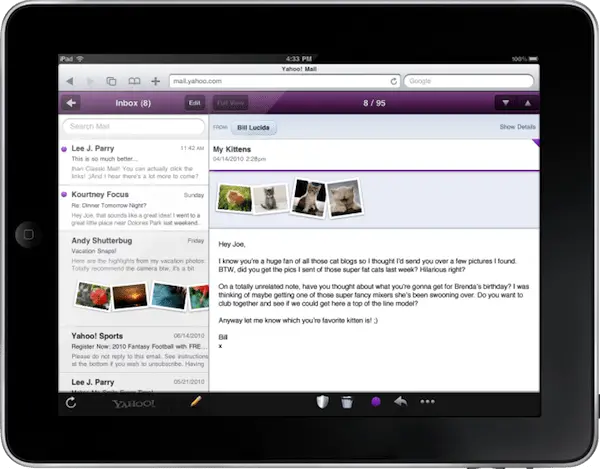
Yahoo has recently launched an HTML5 optimized version of their Yahoo Mail browser client for iPad & iPhone that offers local caching to search & access messages offline, inbox image attachment previews & an a new double pane iPad optimized interface. There have also been some enhancements made to search including Full Search, Smart folders & personal folders & new or latest views for file & photo attachments.

You can check out the new & improved Yahoo Mail for iPad at http://mail.yahoo.com/ through Safari on your iPad.

“If you’ve used our recently launched HTML5 mobile Web mail for iPhone you’ll feel right at home,” writes by Lee Parry, product manager for Yahoo Mail. “We’ve kept all the things users love about our new mobile Web mail experience, whilst also optimizing for the elegant large screen of the iPad.”

Source TUAW
read more...

Tuesday, August 17, 2010

Verizon for iPad & iPhone clues in iOS 4 Code


We have found over at BGR some interesting tidbits in the latest iOS 4 code. The block of code shown above is comparable to code that usually appears before a major product launch, leading many to believe this is proof of an impending Verizon CDMA iPhone or second generation iPad.

Actually the code will allow a CDMA iDevice to bypass iTunes during the activation procedure allowing for auto-activation of a CDMA iPhone or iPad. The cause for this is to allow for field-testing by carriers without the need to activate the device. The code, in the past, is removed right before the carrier launches the device.

Source BGR
read more...

Monday, August 16, 2010

How to Jailbreak iOS 4.0.2 Using with Redsn0w

As it appears to have only been tested on an iPhone 3G & an iPod touch 2G (non-MC model) as of yet, it looks like Redsn0w can jailbreak the latest firmware released by Apple today, iOS 4.0.2. If you are interested in doing this, so here is a step by step guide is posted below.
  • Download iOS 4.0.2 through iTunes 9.2.1.
  • Update your iPhone to the latest firmware you downloaded in step 1.
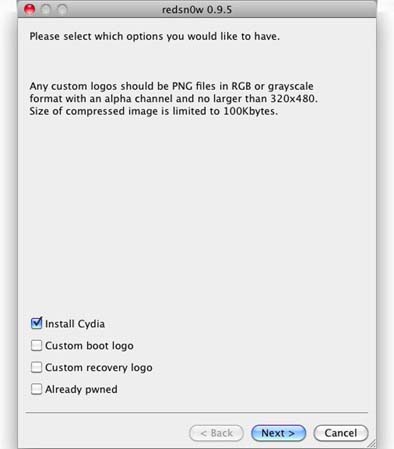
  • Now Start Redsn0w 0.95b5-5 & select iOS 4 (Final Version), not iOS 4.0.2.

  • Select “Install Cydia”, with followed by “Next”
  • Now, Turn your device OFF & connect it to your PC before clicking next, as directed on the screen. (image below)
  • Put your iPhone into recovery mode by following the onscreen directions

  • Redsn0w will now complete the procedure & leave you with a jailbroken iPhone or iPod touch running the latest iOS 4.0.2 firmware release
read more...

Apple Released iOS 4.0.2 for iPhone and 3.2.2 for iPad


Apple has just released iOS 4.0.2 for iPhone & firmware update 3.2.2 for the iPad. These latest updates fix a PDF exploit used by developers for the JailbreakMe tool. This of course means if you would like to keep your jailbroken iPhone, you will want to avoid this latest update, which isn’t a big deal as it doesn’t appear to bring any other major fixes or features.

iOS 4.0.2 for iPhone & 3.2.2 for iPad are available now via iTunes. We will keep you posted if any new discoveries are found in iOS 4.0.2.

Source Gizmodo
read more...

Madden 2011 for iPad and iPhone Now Available on App Store


EA has released Madden 2011 for iPhone & iPad, marking the first iPad iteration of the long running console franchise & bringing with it many of the new & latest features originally debuted in the console version of the title.

As this is certainly not the full fledged Madden experience you have come to suppose with the console version, it’s certainly a step up from many other lack luster console ports. EA also seems committed to making it an genuine Madden experience with plans to implement multiplayer into the iPad version soon a “Vintage Voltage Football” mode, a Madden-style recreation of table top electric football games.


Madden 2011 for iPhone & iPad will run you a little more than the average console port from a high profile developer & publisher, coming in at $12.99 for the iPad version & $7.99 for the iPhone version.

Source TUAW & iTunes
read more...

Sunday, August 15, 2010

Password Protector for Your iPhone Apps with Locktopus from Cydia


Jailbroken iPhone & iPod touch users that are upset about prying eyes checking out potentially personal data within apps on their iDevice will be interested in the Locktopus app available on the Cydia Store.

Locktopus will allow you to password protect specific, individual apps & show you which are locked & unlocked with an icon on app icon itself (as shown in the image above). The feature also seems to work easily with apps stored within iOS 4’s folder functionality.


Jailbroken iPhone & iPod touch users can grab Locktopus for USD $2 from the Cydia Store now.

Source RedmondPie
read more...

Monday, August 9, 2010

Hactivation Patch – Easily Repair for Different SIM Detected Error on iPhone After Jailbreak

Couple of days back we had posted manual repair for Different SIM Detected on iPhone after users have jailbreaked their iPhone with JailbreaMe & using Phonebook SIM card method to activate. For non-technical users solution may look difficult or may not be ready to perform such complicated steps. For those users here is quick & automated fix for “Different SIM Detected”.

The process only requires you to add repo & install cydia app that’s it. Follow below guidance to quickly & easily repair the issue.

How to Repair Different SIM Detected on Jailbroken iPhone 4, 3GS and 3G

1. Put back your Phonebook SIM card to get out of emergency mode

2. Now start Cydia from springboard

3. Go to Manage -> Sources section

4. Now click on Edit & then Add button & add following repo URL to sources

http://cydia.pushfix.info

5. Now go to Cydia Search option & search for “Hactivation”

6. Tap on Hactivation Patch from search result & click on Install & confirm & let it complete the rest of the procedure.


Now remove your phonebook SIM card & use start using your carrier SIM card.

Via Sharif Hashim & BlogsDNA
read more...

Friday, August 6, 2010

Repair Different SIM Detected on Emergency Mode After your iPhone 4/3GS/3G Jailbreak

As yet thousands of iPhone users have jailbreaked their iDevice with simplest & east ever userland jailbreak, JailbreakMe. It was fairly surprising to know that JailbreakMe was using bug in Safari browser for rendering PDF files. We all know it is just matter of time that Apple will issue a fix to block the jailbreakme very soon.

However the clever trick of using Phonebook SIM card to activate iPhone seems to have ended, as per Hashim Sherif recent tweets, Apple has got the way to block phonebook sim card trick which used to work, they fixed by hooking the activation wildcard ticket to the ICCID of the used sim.

This wasn’t the case two days ago & that’s why those who used Phonebook test sim card method recently got the “Different SIM Detected” message on emergency mode screen. You can still jailbreak and unlock with phonebook SIM card method but will not be able to use carrier sim as it will revert back.
iPhone Different SIM Detected on Emergency Mode

Well here is nifty workaround to fix different sim detected on your iPhone 4, 3GS & 3G after jailbreaking with jailbreakme.

Repair Different Sim Detected (Emergency Mode) After iPhone 4/3Gs/3G Jailbreak

If phone after jailbreak & unlock go to emergency mode, you must:

1. Download ifunbox software

2. Run software & sync with iPhone 4/3GS/3G

3. Download lockdown folder from gsmhosting

4. Go to /private/var/root/Library/ & delete original lockdown folder & put lockdown folder downloaded in step 3

5. Restart iPhone.

That’s it; now use your iPhone with your choice of carrier sim.

Source Hashim Sherif & GSMhosting
read more...

Wednesday, August 4, 2010

How to Jailbreak iPod Touch 3G 4.0.1 and 4.0 iOS MC Model Using with JailbreakMe

iPod Touch 3G & iPod Touch 2G MC Model users are fairly unfortunate in jailbreak situation as iPhone dev team’s Redsn0w & Pwnagetool doesn’t support iPod Touch 3G/2G MC Model jailbreaking. The only tool which lets you to jailbreak iPod Touch 3G is Sn0wbreeze 1.7.

However Sn0wbreeze 1.7 is Windows based tool & can only jailbreak iPod Touch 3G you have SHSH blobs saved for iPod Touch 3G 3.1.2, which many users don’t have. Well now here is your golden chance, JailbreakMe userland jailbreak is able of jailbreaking iPod Touch 2G & iPod Touch 3G from iPhone OS 3.1.2 to iOS 4.0.1.

Don’t overlook this chance & get your iPod Touch jailbroken now as Apple will block this jailbreak with new update any time soon. Below is step by step guidance to jailbreak iPod Touch 3G 4.0.1 iOS & 4.0 iOS. You can also follow this direction to jailbreak iPod Touch 2G MC model.

How to Jailbreak iPod Touch 3G 4.0.1 & 4.0 iOS Using with JailbreakMe

1. Update your iPod Touch 3Gto iOS 4.0.1 (iPod Touch 4.0 iOS will also work)

2. Connect your iPod Touch via Wifi network

3. Open safari from springboard & browse following website.

http://jailbreakme.com

4. You will be presented with following screen

iPhone 4 Jailbreak with JailbreakMe

5. Click on “Slide to jailbreak” & let the jailbreakme complete the rest of jailbreak process.

6. Upon completion you will be presented with message “Cydia has been added to the home screen”

7. That’s it you have successfully jailbreaked your iPod Touch 3G 4.0 iOS. Enjoy.

Please note: Proceed at your own risk; we will not be responsible if you brick your iPod Touch by following above guide.
read more...

How to Jailbreak iPhone 4 4.0.1/4.0 iOS using JailbreakMe 2.0

Finally the wait for iPhone 4 users is ended. Courage like jailbreak tool, JailbreakMe  to jailbreak iPhone 4 with iOS 4.0 & iOS 4.0.1 has been released by Comex. JailbreakMe aka Star is the userland jailbreak meaning you just need to point your iPhone & iPod Touch to one website & it will immediately jailbreak your iPhone & iPod Touch.

JailbreakMe supports iPhone 3GS New Bootrom/old Bootrom, iPhone 3G, iPod Touch 2G, iPod Touch 3G, iPad and recently launched iPhone 4 with iOS 4.0 & iOS 4.0.1. The complete iPhone 4 jailbreak process is quite simple & doesn’t require much skill to do it. However you must keep in mind that JailbreakMe 2.0 doesn’t hacktivate iPhone 4. Your iPhone 4 must be activated before you proceed for iPhone 4 jailbreak using JailbreakMe.

Below is step by step direction to jailbreak iPhone 4 4.0.1/4.0 iOS for those new jailbreakers.

How to Jailbreak iPhone 4 4.0.1/4.0 iOS

1. Download & install iTunes 9.2.1

2. Backup your iPhone 4 data using with iTunes

3. You may update iPhone 4 iOS 4.0.1 (not compulsory)

4. Now open Safari browser on from your iPhone 4 springboard

5. Now browse http://jailbreakme.com website on your safari. You will be presented with screen similar to below image
iPhone 4 Jailbreak with JailbreakMe

6. Click on slide to jailbreak to preliminary jailbreak process.

7. JailbreakMe will start downloading required files & will start jailbreak process. Let it complete jailbreak process.

8. Once jailkbreak process is complete you will be presented with message, “Cydian Has been added to the home screen”

9. Click “Ok” on message and checkout springboard for Cydia, that’s it you have successfully jailbreaked iPhone 4 4.0.1 iOS or 4.0 iOS. Enjoy.

There are certain issues faced by iPhone users after Jailbreaking iPhone 4 using with JailbreakMe, like FaceTime/MMS issues. Comex is working on fix for this. Couple of users has found rebooting iPhone 4 two/three time fixes above issue, perhaps you might try that.

Please Note: Proceed at your own risk, We will not be liable if you brick your iPhone by following above guide.
read more...

Comex Released Official iPhone 4 Jailbreak


Developer Comex has just released the extremely anticipated jailbreak for iPhone 4, allowing users of Apple’s latest iPhone, as well as iPad & iPod touch users running iOS 4 to jailbreak their device. The jailbreak is available now via a new website called JailbreakMe.com, specially set up for the new browser based jailbreak process. A full list of supported devices is posted below.

In order to jailbreak your iPhone 4, or iDevice of selection running iOS 4, you can navigate using the device’s browser to the below URL http://jailbreakme.com/

@comex notes, “If it hangs at a purple screen, it’s because the server fails”.

The servers will absolutely be quite congested for a while, but you can try http://jailbreakme.modmyi.com/_/ as an alternative if you can’t wait for the excitement to die down.

Known issues so far: (1) fail on iPad 3.2.1 (2) losing MMS (but not for everyone)

Any problems, bugs, or complaints about the new jailbreak can be directed to its creators through comexk@gmail.com.

Supported devices are as below:

iPod 1G on 3.1.2
iPod 1G on 3.1.3
iPod 2G on 3.1.2
iPod 2G on 3.1.3
iPod 2G on 4.0
iPod 3G on 3.1.2
iPod 3G on 3.1.3
iPod 3G on 4.0
iPad on 3.2
iPad on 3.2.1
iPhone 3G on 3.1.2
iPhone 3G on 3.1.3
iPhone 3G on 4.0
iPhone 3G on 4.0.1
iPhone 3G[S] on 3.1.2
iPhone 3G[S] on 3.1.3
iPhone 3G[S] on 4.0
iPhone 3G[S] on 4.0.1
iPhone 4 on 4.0
iPhone 4 on 4.0.1

Source @comex
read more...

Friday, July 30, 2010

How to Get the Right Jailbreak Tool for iOS Device of Choice

If you are continuously confused when trying to figure out which jailbreak is right for your specific iPhone, iPad, or iPod touch of choice, the Jailbreak Matrix chart  is accurately what you’re looking for. This chart shows you exactly what jailbreak options are available for your iOS device based on the firmware, baseband & boot loader.  It will also let you know which software to use & whether or not a specific jailbreak has been tested with iTunes.

Not only will you been able see if there is an available jailbreak option available for your device, you will also be capable to click the link under “Jailbreak Options” in order to access a step by step guide for that specific jailbreak. There are also download links for the firmware & version of iTunes required for the process. As more & more iOS devices & jailbreak options are released, the Jailbreak Matrix chart will absolutely come in handy for many.

You can check out the full Jailbreak Matrix chart here.

Source lifehacker
read more...

How to Access Music, Movies & Documents from Your Mac to PlayStation 3

The majority of PS3 users find the process of accessing their media on a Mac quite a hassle to say the least. Windows users have it easy with the PlayStation 3’s Universal Plug & Play (UPnP) feature, but Mac users have been left in the cold to try & find a half decent UPnP server to work easily.

One option is to utilize software such as Vuze, which has a beta “Device Playback” feature that allows you to simply sync your content with your PS3 wirelessly. With a simple “drag-and-drop to transfer media from your Vuze library (or anywhere on your desktop) to the device of your choice”, including your PS3, you can view all your media immediately. Other than the PlayStation 3, Vuze’s “Device Playback” feature also supports iPad, iPod, iPhone, TiVo & Xbox.


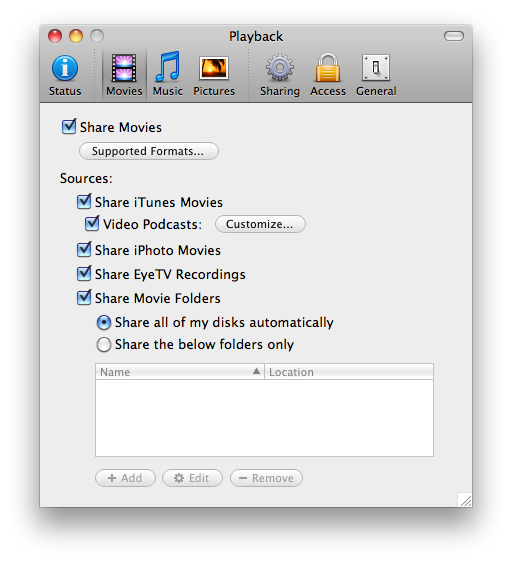
Another option is to utilize Playback ($15) by developer Yazsoft. This application takes the process of accessing media on your Mac from your PS3 to a while new level, automatically integrating your iTunes, Aperture & iPhoto libraries with your PS3 XMB’s (Cross-Menu-Bar) Music, Video & Photo menus. You can get the software for free by reviewing it for your website, or get a $5 discount by tweeting about the software on Twitter. You can get more info & a free 7-day trial here.
Source Yazsoft & Vuze
read more...

Wednesday, July 28, 2010

Apple Released iBooks 1.1.2 Update


Just last week Apple released iBooks update 1.1.1 that brought a number of new & latest features to their native eBook app. Today that have released yet another update, iBooks 1.1.2 that addresses an issue that many users were having when trying to update to 1.1.1.

If you tried to install iBooks update 1.1.1 & experienced issues while doing so, this latest release will most likely ensure the installation process happens easily. So if you couldn’t get update 1.1.1. Installed properly, give this latest 1.1.2 update a try. The only listed fix in the latest update is as follows: “Addresses a minor issue when updating iBooks.”

Source TUAW
read more...

Samsung Giving Away Free Galaxy S Android Phones for iPhone 4 Users


Are you not happy with your iPhone 4 reception/antenna issues? Reports have been coming in saying Samsung has been giving away free, unlocked Samsung Galaxy S Android smartphones to disgruntled iPhone 4 owners through their @samsungukmobile.


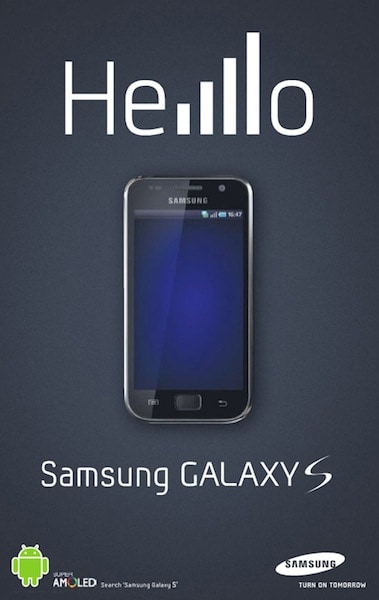
Reports appear to be that Samsung has given away multiple devices to iPhone 4 users complaining about antenna issues. They also ran the ad above today mocking the iPhone 4 reception issues with the word “Hello” using signal strength bars for L’s.

Here is the official statement from Samsung UK.

“Recently there has been a real boost in online activity from consumers disgruntled with some of our competitors’ products. We decided to contact a cross section of individuals to offer them a free Samsung Galaxy S as a substitution, as we’re confident that once people have the phone in their hands, they’ll see how remarkable it is for themselves.”

Source Gizmodo
read more...

Friday, July 23, 2010

Apple begins To Issue Refunding for iPhone 4 Bumpers


Apple announced during the press conference addressing the iPhone 4 antenna issues that not only will free of charge bumpers or third party cases be given to iPhone 4 owners, but those that have already purchased one would be issued a refund.

Steve Jobs talk about it would take a little while to get the program up & running. While it doesn’t appear you are capable to get your hands on your free bumper or case yet, today it appears Apple has started processing refunds for bumpers already purchased by iPhone 4 users.

The process is completely automatically, thus you shouldn’t have to do anything to get your refund. Also the announcement (image above) noted that all VAT & shipping charges will also be refunded. Those who made their purchase with a credit card should receive their refund within 3 to 5 business days.

Source Gizmodo
read more...

Thursday, July 22, 2010

Foursquare iPhone App Updates Including Extraordinary Features

At the beginning of this week Foursquare, the location based social service, celebrated a big success. It celebrated the 100 millionth check in. And it seems now that to celebrate the feat, it has updates its Foursquare app for iOS 4 with features that will keep you more attracted towards the service.

Foursquare App For iPhone iOS4

Foursquare App For iPhone iOS4

The eye catching update is the capability to SMS & emails your Foursquare friends, without leaving the app. You just have to tap on the name of a friend & a pop up comes asking which type of message you want to send. Neat!!!

This SMS feature from within Foursquare app works only if your friends have added their phone numbers. Further more interesting features of this updated Foursquare app for iOS 4 includes:
  • The noticeable high resolution of Retina display.
  • Quicker background refresh for iOS 4.
  • Current position locator for all maps.
  • All Foursquare:// urls now open without crashing in other apps, when Foursquare is running in background.
You can grab the iPad/iPhone app for Foursquare for free from here.

Source thenextweb
read more...

FileMaker Go for Your iPhone & iPad Now Availalble


Possibly one of the most popular database applications for many, especially Mac users, is Filemaker. Now the Apple subsidiary has officially launched mobile versions of the software for iPhone & iPad.  The iPhone & iPod touch version is available for $19.99, though the iPad version will cost you a hefty $39.99.

Unfortunately, the two applications will not permit you to create a new database from your mobile iDevice of choice, for that you’ll need FileMaker 7 or advanced for Windows or Mac. What the app will allow you to do are view databases you’ve created on your Mac or PC over 3G or WiFi, browse & search, and update records. You can also copy databases to your iDevice of choice in order to function in a fully mobile mode through box.net, Dropbox, iTunes, email & more.

You can get FileMaker Go for your iPhone, iPod touch & iPad here.

Source  TUAW
read more...

Skype iPhone App Update Gets Multitasking Support


The Skype iPhone app has finally been updated to include support for iOS 4’s multitasking functionality; effectively allowing you to receive Skype calls & chats when the app isn’t running in the foreground. This comes after an update in May that brought support for 3G video calling.

“Run Skype in the background including multitasking in iOS4. Receive Skype calls & IM while other apps are running or when your iPhone is locked. You can also carry on your call while you switch to another application. Multitasking is available only with iPhone 4 & iPhone 3GS.”

You can grab Skype for your iPhone, iPod touch, & iPad here. Requires iOS 3.0 or later.

Source MacRumors
read more...

Wednesday, July 21, 2010

Save iOS 4.0.1 SHSH Blobs for Your iPhone 4, iPhone 3GS, iPhone 3G & iPod Touch 2G

Saving of SHSH blobs has become important for not only iPhone 3GS & iPhone 4 users but for iPhone 3G & iPod Touch 2G users also. Yesterday we reported about Cydia started saving SHSH Blobs for iPhone 3G & iPod Touch 2G. If you have missed your chance to save SHSH Blobs for iOS 4.0 then here is you’re another chance to save SHSH bobs for iOS 4.0.1 which can be jailbreaked with Redsn0w 0.9.5 Beta 5 & unlocked with Ultrasn0w 0.93.

A spirit jailbreak for iOS 4.0 on iPhone 3GS new bootrom will release any time soon & it might also work on iOS 4.0.1. TinyUmbrella has been updated to 4.01.03 & now supports iPhone 3GS, iPhone 3G & iPhone 4 iOS 4.0.1 on Mac, Linux & Windows. You can use Cydia or TinyUmbrella for saving iOS 4.0.1 SHSH Blobs for your iDevice.
TinyUmbrella
TinyUmbrella 4.01.03


Source Blogsdna
read more...
Add to My Yahoo! 9AAFA2826E0327178FFD38A51C260C7E RSS Search Add URL Pro - Search Engine Submission and Optimization Services Free RSS Feeds Directory Latest Technology, Latest Gadgets